

 很久以前,我曾是一名 Solaris 管理员。那个操作系统在 Oracle 手中几近消亡,但一批衍生版本的社区仍在延续。其中之一便是 Tribblix:
Tribblix 是一个衍生自 OpenSolaris、OpenIndiana 与 illumos 的操作系统发行版,兼具复古风格与现代组件。基础内核和命令来自 illumos,其余一切都从零重建。
Tribblix 是一个传统系统。软件以 SVR4 包形式分发,相比笨重的桌面环境更偏好轻量窗口管理器,主要的桌面选项是 Xfce,同时也提供 MATE 与 Enlightenment,以及其他许多选择。这个系统灵活、快速,对用过 Solaris 的人来说很熟悉,同时在其坚实的基础之上提供现代软件。
Tribblix 并不只是另一个 illumos 发行版的衍生或重打包。它是一个完全独立的发行版,虽然共享 ZFS、zones、DTrace、SMF 等关键 illumos 技术,但基本上是从零构建的,拥有自己的构建与打包系统。
我会非常努力地避免开 The Trouble With Tribblix 这类玩笑……
所以,如果考虑 x86 的类 Unix 系统,你的选择有:
- Linux,有众多发行版
- 各种 BSD(Free、Open 和 Net)
- 一些仍在苟延残喘的专有系统
- Minix,一款至今仍可下载运行的教学操作系统
- 基于 Solaris 的发行版
看看其他项目是怎么做的总是很有意思,那就来跑一跑吧。我用的是 0m40(版本 0,里程碑 40)。
我在家里的 Proxmox 上开了一台 4 核/4GB 的 VPS。我不会重复 Tribblix 的 install instructions,安装说明相当简单直接。你从 CD 启动,登录,su 到 root,查出磁盘名,然后运行 live_install.sh 脚本。
我只装了最基础的组件……结果这也许是个错误。这点稍后再说。
首次启动
以“jack”(默认用户)登录后,ps 显示如下:
jack@tribblix:~$ ps -ef
UID PID PPID C STIME TTY TIME CMD
root 0 0 7 11:52:24 ? 0:01 sched
root 4 0 0 11:52:24 ? 0:00 kcfpoold
root 5 0 0 11:52:24 ? 0:01 zpool-rpool
root 1 0 0 11:52:25 ? 0:00 /sbin/init
root 2 0 0 11:52:25 ? 0:01 pageout
root 3 0 0 11:52:25 ? 0:00 fsflush
root 529 1 0 11:52:42 ? 0:00 /usr/lib/inet/inetd start
root 9 1 0 11:52:25 ? 0:01 /lib/svc/bin/svc.startd
root 11 1 0 11:52:25 ? 0:04 /lib/svc/bin/svc.configd
root 112 1 0 11:52:29 ? 0:00 /usr/lib/pfexecd
netadm 47 1 0 11:52:28 ? 0:00 /lib/inet/ipmgmtd
netcfg 44 1 0 11:52:28 ? 0:00 /lib/inet/netcfgd
dladm 40 1 0 11:52:28 ? 0:00 /sbin/dlmgmtd
root 175 1 0 11:52:30 ? 0:00 /usr/lib/rcm/rcm_daemon
root 733 1 0 11:52:42 ? 0:00 /usr/sbin/sshd
root 393 9 0 11:52:31 ? 0:00 /usr/lib/saf/sac -t 300
root 162 1 0 11:52:30 ? 0:00 /usr/lib/zones/zonestatd
root 374 9 0 11:52:31 console 0:00 /usr/lib/saf/ttymon -g -d /dev/console -l console -m ldterm,ttcompat -h -p trib
root 248 1 0 11:52:30 ? 0:00 /usr/lib/picl/picld
root 169 1 0 11:52:30 ? 0:00 devfsadmd
root 81 1 0 11:52:29 ? 0:00 /lib/inet/in.mpathd
root 506 1 0 11:52:32 ? 0:00 /usr/sbin/in.routed
root 204 1 0 11:52:30 ? 0:00 /lib/inet/nwamd
root 148 1 0 11:52:30 ? 0:00 /usr/lib/sysevent/syseventd
root 283 1 0 11:52:30 ? 0:00 /sbin/dhcpagent
root 558 1 0 11:52:42 ? 0:00 /usr/sbin/syslogd
root 151 1 0 11:52:30 ? 0:00 /usr/lib/power/powerd
root 508 1 0 11:52:40 ? 0:00 /usr/lib/inet/in.ndpd
jack 739 737 0 11:52:49 pts/2 0:00 ps -ef
root 633 1 0 11:52:42 ? 0:00 /usr/perl5/bin/perl /usr/lib/intrd
root 372 1 0 11:52:31 ? 0:00 /usr/lib/utmpd
root 416 393 0 11:52:31 ? 0:00 /usr/lib/saf/ttymon
root 690 1 0 11:52:42 ? 0:00 /usr/sbin/nscd
root 426 1 0 11:52:31 ? 0:00 /usr/sbin/cron
daemon 513 1 0 11:52:42 ? 0:00 /usr/sbin/rpcbind
root 734 733 0 11:52:45 pts/1 0:00 /usr/lib/ssh/sshd-session -R
jack 736 734 0 11:52:48 pts/1 0:00 /usr/lib/ssh/sshd-session -R
jack 737 736 0 11:52:48 pts/2 0:00 -bash
root 611 1 0 11:52:42 ? 0:00 /usr/lib/fm/fmd/fmd
其中一些很眼熟。有一些 ZFS,而“SAF”是 Solaris 的服务管理框架。
有一处引起了我的注意:
root 633 1 0 11:52:42 ? 0:00 /usr/perl5/bin/perl /usr/lib/intrd
那是什么?
jack@tribblix:~$ file /usr/lib/intrd
/usr/lib/intrd: executable /usr/perl5/bin/perl script
$ vi /usr/lib/intrd
-bash: vi: command not found
哦……这是那种需要你自己安装 所有东西 的操作系统之一。everything.
more(1) 已安装,于是我查看了这个文件,它带有 Sun 的 CDDL license,但没有任何说明其用途的注释。不过 man page 解释道:
intrd 守护进程在启动时启动,用于监控中断与 CPU 之间的分配
关系。如果 intrd 判定当前的分配
不均衡且有损系统性能,它就会
生成并实施新的分配。
好吧,没我想的那么带劲。
nscd 正在运行。我看得太快,以为它是 nsd,但其实那是名称服务缓存守护进程。
当然,这里没有 systemd。事实上,Tribblix 使用非常传统的 rc.d 启动脚本。看看 /etc:
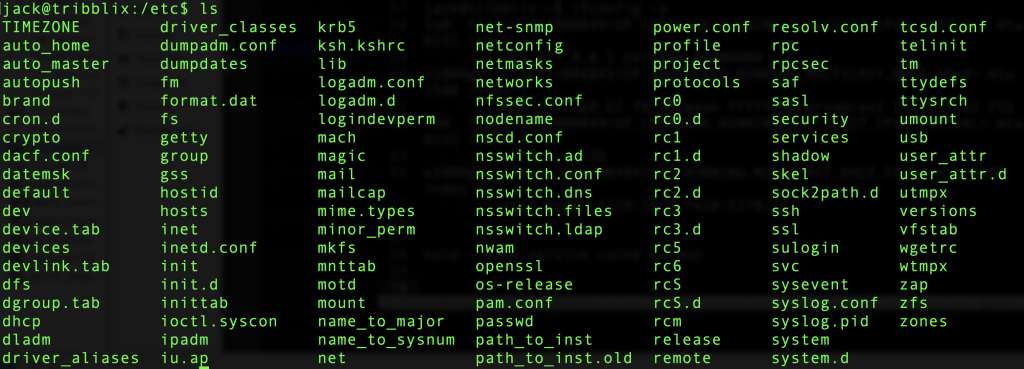
安装 vi:第 1 次尝试
我想要有 vi,那就试着装一下吧。如果我在 live 安装时装了额外的“overlays”,大概就已经有它了,但既然没有,就该看看包管理了。
jack@tribblix:/etc$ man -k pkg
pkgadd(8) - transfer software packages to the system
pkgadm(8) - manage packaging system
pkgask(8) - stores answers to a request script
pkgchk(8) - check package installation accuracy
pkginfo(1) - display software package information
pkginfo(5) - package characteristics file
pkgmap(5) - package contents description file
pkgmk(1) - produce an installable package
pkgparam(1) - display package parameter values
pkgproto(1) - generate prototype file entries for input to pkgmk command
pkgrm(8) - remove a package from the system
pkgtrans(1) - translate package format
遗憾的是,docs 对如何查找和安装软件包只字未提。
也许软件包在 CD 上。
有一份关于如何使用可移动介质的文档。在我预期会挂载 CDROM 的 /media 目录里什么都没有,于是我按照文档安装了软件包并运行了 svcadm 命令来启用 rmvolmgr,它本应能检测并挂载可移动介质。
做完这些步骤后,我在 Proxmox 里插入了一张 CDROM(.iso)(我在首次启动时把它移除了),但它没有出现。
root@tribblix:/root# ls /media
root@tribblix:/root#
dmesg 显示了这些行:
Jul 25 12:04:38 tribblix pseudo: [ID 129642 kern.info] pseudo-device: eventfd0
Jul 25 12:04:38 tribblix genunix: [ID 936769 kern.info] eventfd0 is /pseudo/eventfd@0
Jul 25 12:05:17 tribblix pseudo: [ID 129642 kern.info] pseudo-device: devinfo0
Jul 25 12:05:17 tribblix genunix: [ID 936769 kern.info] devinfo0 is /pseudo/devinfo@0
Jul 25 12:05:19 tribblix scsi: [ID 583861 kern.info] sd0 at ata1: target 0 lun 0
Jul 25 12:05:19 tribblix genunix: [ID 936769 kern.info] sd0 is /pci@0,0/pci-ide@1,1/ide@1/sd@0,0
Jul 25 12:05:19 tribblix genunix: [ID 127566 kern.info] device pciclass,030000@2(display#0) keeps up device sd@0,0(sd#0), but the former is not power managed
Jul 25 12:05:19 tribblix svc.startd[9]: [ID 652011 daemon.warning] svc:/system/hal:default: Method "/lib/svc/method/svc-hal start" failed with exit status 95.
Jul 25 12:05:19 tribblix svc.startd[9]: [ID 748625 daemon.error] system/hal:default failed fatally: transitioned to maintenance (see 'svcs -xv' for details)
Jul 25 12:05:19 tribblix fmd: [ID 377184 daemon.error] SUNW-MSG-ID: SMF-8000-YX, TYPE: defect, VER: 1, SEVERITY: major
Jul 25 12:05:19 tribblix EVENT-TIME: Sat Jul 25 12:05:19 PDT 2026
Jul 25 12:05:19 tribblix PLATFORM: Standard-PC-(i440FX-+-PIIX,-1996), CSN: -, HOSTNAME: tribblix
Jul 25 12:05:19 tribblix SOURCE: software-diagnosis, REV: 0.1
Jul 25 12:05:19 tribblix EVENT-ID: e81356fd-5c1d-405f-b00b-d41b568e8583
Jul 25 12:05:19 tribblix DESC: A service failed - a start, stop or refresh method failed.
Jul 25 12:05:19 tribblix Refer to http://illumos.org/msg/SMF-8000-YX for more information.
Jul 25 12:05:19 tribblix AUTO-RESPONSE: The service has been placed into the maintenance state.
Jul 25 12:05:19 tribblix IMPACT: svc:/system/hal:default is unavailable.
Jul 25 12:05:19 tribblix REC-ACTION: Run 'svcs -xv svc:/system/hal:default' to determine the generic reason why the service failed, the location of any logfiles, and a list of other services impacted.
我试着查阅列出的一些调试步骤。例如:
root@tribblix:/root# cat /var/svc/log/system-hal:default.log
[ Jul 25 12:05:17 Enabled. ]
[ Jul 25 12:05:17 Executing start method ("/lib/svc/method/svc-hal start"). ]
hal failed to start: error 1
[ Jul 25 12:05:19 Method "start" exited with status 95. ]
[ Jul 25 12:05:19 Rereading configuration. ]
唔。
在 rmvolmgr 安装过程中,提到了一个 zap 命令。
zap 工具用于管理 Tribblix 上的软件包、zones 以及系统 升级。
man page 非常简略,但有“zap help”,会给出诸如“search”和“whatprovides”等各种子命令。
root@tribblix:/root# zap whatprovides /usr/bin/vi
usr/bin/vieet f TRIBe19-efl
usr/bin/vi s TRIBeditor-vim
usr/bin/view s TRIBeditor-vim
usr/bin/vim f TRIBeditor-vim
usr/bin/vimdiff s TRIBeditor-vim
usr/bin/vimtutor f TRIBeditor-vim
usr/bin/vimdot f TRIBgraphviz
usr/bin/vips f TRIBlibvips
usr/bin/vipsedit f TRIBlibvips
usr/bin/vipsheader f TRIBlibvips
usr/bin/vipsprofile f TRIBlibvips
usr/bin/vipsthumbnail f TRIBlibvips
usr/bin/visualvm s TRIBv-visualvm
usr/bin/virtualenv s TRIBvirtualenv-python-313
usr/bin/viewres f TRIBx11-viewres
找到了!好,来试试这个……
root@tribblix:/root# zap install TRIBeditor-vim

Installing 2 packages:
TRIBeditor-vim
TRIBlibsodium

Fetching https://pkgs.tribblix.org/tribblix-m40//TRIBlibsodium.1.0.22.0.zap
Download TRIBlibsodium.1.0.22.0.zap checksum verified
Signature of TRIBlibsodium.1.0.22.0.zap verified
Fetching https://pkgs.tribblix.org/tribblix-m40//TRIBeditor-vim.9.1.2132.0.zap
Download TRIBeditor-vim.9.1.2132.0.zap checksum verified
Signature of TRIBeditor-vim.9.1.2132.0.zap verified
Installing TRIBlibsodium

Installation of  was successful.
Installing TRIBeditor-vim

Installation of  was successful.
Installed 2 packages
vi 能用了。
怪癖
我曾读到,各种 Unix 之间的主要区别在于系统启动、记账(accounting)和包管理。我们已经看到启动是基于 rc.d 的。记账是 SVR4 式的(说实话,如今已很少使用,在许多部门和用户共用一台系统的年代更有意义),而包管理则不同于 Linux/BSD。
我注意到启动时有一条奇怪的消息,被记录在 dmesg 里:
Jul 25 11:52:24 tribblix pci: [ID 370704 kern.info] PCI-device: pci1af4,1100@1,2, uhci0
Jul 25 11:52:24 tribblix genunix: [ID 936769 kern.info] uhci0 is /pci@0,0/pci1af4,1100@1,2
Jul 25 11:52:24 tribblix i8042: [ID 526150 kern.info] 8042 device: keyboard@0, kb8042 # 0
Jul 25 11:52:24 tribblix genunix: [ID 936769 kern.info] kb80420 is /pci@0,0/isa@1/i8042@1,60/keyboard@0
Jul 25 11:52:24 tribblix i8042: [ID 526150 kern.info] 8042 device: mouse@1, mouse8042 # 0
Jul 25 11:52:24 tribblix genunix: [ID 936769 kern.info] mouse80420 is /pci@0,0/isa@1/i8042@1,60/mouse@1
Jul 25 11:52:24 tribblix unix: [ID 950921 kern.info] cpu0: x86 (chipid 0x0 GenuineIntel 60FB1 family 15 model 107 step 1 clock 1800 MHz)
Jul 25 11:52:24 tribblix unix: [ID 950921 kern.info] cpu0: QEMU Virtual CPU version 2.5+
Jul 25 11:52:24 tribblix unix: [ID 551322 kern.info] KPTI enabled (PCID not supported, INVPCID not supported)
Jul 25 11:52:24 tribblix unix: [ID 417328 kern.warning] WARNING: cpu1: CPUID.0xD returns invalid value: hw_low = 0, hw_high = 0, xsave_size = 0, ymm_size = 0, ymm_offset = 0
Jul 25 11:52:24 tribblix unix: [ID 950921 kern.info] cpu1: x86 (chipid 0x0 GenuineIntel 60FB1 family 15 model 107 step 1 clock 1800 MHz)
Jul 25 11:52:24 tribblix unix: [ID 950921 kern.info] cpu1: QEMU Virtual CPU version 2.5+
Jul 25 11:52:24 tribblix unix: [ID 557947 kern.info] cpu1 initialization complete - online
不确定这是什么意思,但可能是因为它是一颗 Tribblix 未曾预料到的 QEMU 虚拟 CPU。
重启时也看到了这个:
root@tribblix:/root# reboot
bootadm: failed to open file: /rpool//platform/i86pc/kernel/unix: No such file or directory
我想看看 Tribblix 会如何报告硬件信息。有一个 /proc,但它仅是进程信息。然后我想起了一点 Solaris 时代的记忆,以及 psrinfo:
root@tribblix:/proc# psrinfo -v
Status of virtual processor 0 as of: 07/25/2026 14:58:27
  on-line since 07/25/2026 12:08:57.
  The i386 processor operates at 1800 MHz,
        and has an i387 compatible floating point processor.
Status of virtual processor 1 as of: 07/25/2026 14:58:27
  on-line since 07/25/2026 12:08:57.
  The i386 processor operates at 1800 MHz,
        and has an i387 compatible floating point processor.
Status of virtual processor 2 as of: 07/25/2026 14:58:27
  on-line since 07/25/2026 12:08:57.
  The i386 processor operates at 1800 MHz,
        and has an i387 compatible floating point processor.
Status of virtual processor 3 as of: 07/25/2026 14:58:27
  on-line since 07/25/2026 12:08:57.
  The i386 processor operates at 1800 MHz,
        and has an i387 compatible floating point processor.
准确,尽管不如 Linux 上的 /proc/cpuinfo 那样详细。
而 prtconf 会给出硬件的详细信息,例如:
Memory size: 4096 Megabytes
……以及各种 pci 硬件。
结语
我很享受在 Tribblix 里探来探去。它让我想起早年学习 Unix、尝试各种系统的日子。那时候有 AIX、HP-UX、Solaris、Irix 等等。到了 2026 年,几乎所有东西都是 Linux,为数不多的例外则是 BSD。在庞大的 Unix family tree 中的另一个成员上折腾一番,很有意思。
我想我需要更深入地了解 Solaris 服务和 ZFS,才能真正发挥这个操作系统的优势。时间允许的话,我会再多玩玩 Tribblix。
原文链接:https://lowendbox.com/blog/lets-try-tribblix-the-solaris-derived-x86-64-operating-system/